skip to main |
skip to sidebar
Supplies needed:Tubes~Jasmine Becket-GriffithYou may purchase her tubes hereScrapkit~A Halloween collab kit and I'm using the one by Loeckchen here
Mask~WSL mask 119 here Font~RequiemFor this tutorial you will need a working knowledge of PSP and Animation Shop. I use PSP 9.Thank you to everyone for all of their shares, without you, our creations just wouldn't be the same!!Now before we start, remember that this tut is only a guide, your imagination and talent will make this tag your own!Open a New Layer 650x650 and copy and paste a paper of choice, I used paper 2e.Go to Layers-Load/Save Mask-load mask from disk, choose your mask.Merge group.Copy and paste a frame of choice, I used frame L and add a drop shadow. Click on the frame and use your wand and click inside and copy and paste a paper of choice, I used paper 3f. Modify-expand by 8-invert-delete.I added my tube, resized a little using the raster deform tool and erased any overhang. Next drop shadow and then duplicate the tube and on the original go to blur-gaussian blur-15.Add your name, I used Requiem and an orange dropshadow and then add copyrights.I made my background black.Time for some animation.Click on your mask layer.Go to Effects-Plugins-Alien Skin Xenofex2-Electrify-10-15-30-50-50-50 click okCopy merged into Animation ShopBack to PSP and using the same settings just click on random seed click okCopy merged into AS-right click- paste- after current frameBack to PSP again use the same settings click on random seed click okCopy merged into AS again-right click-paste-after current frameNow save your tag.Thank you for trying out my tut any similiarities to any other tuts is by coincidence only or great minds think alike..lolIf you'd like to show off your tag email me cutiepie_2468@hotmail.com I'd love to see what you've created.Written and created by JustJo63 20th September, 2009

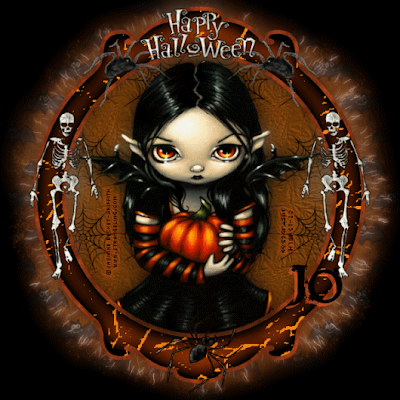
Supplies needed: Tubes~Caron Vinson You may purchase her tubes at here
Scrapkit~It's Halloween by Lacarolita here
Mask~WSL mask 192 here
Font~Harlow Solid Italic
For this tutorial you will need a working knowledge of PSP. I use PSP 9.
Thank you to everyone for all of their shares, without you, our creations just wouldn't be the same!!
Now before we start, remember that this tut is only a guide, your imagination and talent will make this tag your own!
Open a New Layer 650x650 and copy and paste a paper of choice, I used paper 5 Go to Layers-Load/Save Mask-load mask from disk, choose your mask. Merge group.
Copy and paste a frame of choice, I used frame 2 and add a drop shadow. Click on the frame and use your wand and click inside and copy and paste a paper of choice, I used paper 5 again. Modify-expand by 8-invert-delete.
The first tube I used is more of a closeup. I resized a little and made it look like it's in the frame but on top. Erase any overhangs.Add your drop shadow.
Now add your embellishments of choice. I used broom 1 and resized it using the raster deform tool and then rotating it to fit across the front of the frame and added a drop shadow.
Next I added a sitting tube from Caron Vinson so it looks like she's on the broomstick. Resize the tube using the raster deform tool, I find this works best. Add a drop shadow.
Once I had the tag looking as I wanted it, I added the moon behind the frame but on top of the mask layer. Duplicate the moon and on the original add blur-gaussian blur-15. The I added the tree, under the frame but on top of the moon. Resize using the raster deform tool and add a drop shadow. I then typed out Bewitching using paper 6 with an orange outline. I also added one of the bats. I now cropped my tag to make it a little bit smaller and then added copyrights. Add your name and x out the background if you wish, I kept the black background and save as a PNG or a JPEG and you are done!! Thank you for trying out my tut any similiarities to any other tuts is by coincidence only or great minds think alike..lol If you'd like to show off your tag email me cutiepie_2468@hotmail.com I'd love to see what you've created.
Written and created by JustJo63 20th September, 2009
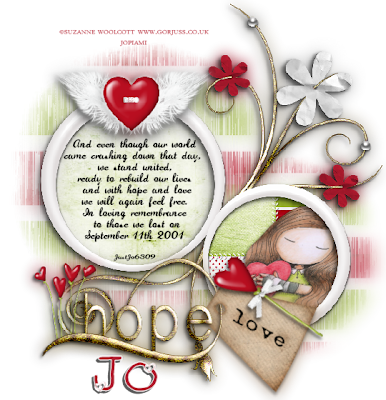 Supplies Needed:Artwork~Suzanne WoolcottYou may purchase her tubes hereScrapkit~Love and Hope by Jaelop Designs hereMask~WSL mask 16 here Font~ 2peas Heart's DelightThank you to everyone for all of your shares, without you, our creations just wouldn't be the same!!For this tutorial you will need a working knowledge of PSP. I use PSP 9.
Now before we start remember that this tut is only a guide, your imagination and talent will make this tag your own!Lets begin!!Open a new Layer 650x650 white or depending on your forum you may choose to x out the background and we will resize later.Choose a paper, I used paper 6 and copy and paste that as a new layer.Go to Layers-Load/Save Mask-load mask from disk, choose your mask.Merge group. Duplicate mask layer. We will move these mask layers around after we add the frame.I then added JD element 34 and resized. Choose your papers and click inside each circle-modify-expand by 8 Invert and then hit delete and make sure you are on the paper layer when you do this. Move your papers below the frame layer. With your tube of choice copy and paste. Now click inside your frame, modify-expand by 8 Invert and then hit delete and make sure you are on the tube layer when you do this. Move your tube below the frame layer but above the paper layer. On one circle I added some words, which I thought were appropriate. You can use mine or add your own. And even though our world came crashing down that day, we stand united, ready to build our lives and with hope and love we will again feel free. In loving remembrance to thosewe lost on September 11th, 2001.Add your embellishments of choice. I added JD element 43, resized it and JD element 52, resized it by using the deform tool and erased part of it so it looked like it was entwined with hope. I added JD element 27 and again using the deform tool resized it and rotated it to sit on top of the love tag. I added JD element 28, resized it and placed it on top of the largercircle. Add your dropshadows and then go back to your mask layers and resize and move them around under the circles.I now resize my tag to about 585x585 and then add copyrights. Add your name and x out the background if you wish and save as a PNG or a JPEG and you are done!!Thank you for trying out my tut any similiarities to any other tuts is by coincidence only or great minds think alike..lolIf you'd like to show off your tag email me cutiepie_2468@hotmail.com I'd love to see what you've created.Written and created by JustJo63 25th August 2009
It's with great sadness that I type this latest note. My daughter Hayley went to have her ultrasound yesterday and sadly they couldn't find a heartbeat. My heart breaks for her and Mat but I feel some relief knowing that they have their happy and healthy little boy Aidan. I've been trying to write new tuts for a few days now and finally got one finished today, which I will post in a few minutes. I'm just trying to keep busy because I can't be there with them.
I'm so happy to announce that I'm going to be a grandmother again and again...lol. Both of my twins, Hayley and Marissa are expecting next March and we just found out the due dates~Missy 8th and Hayley~13th...5 days apart!!! I'm hoping when Hayley has her ultrasound that she's a little further away, I don't know how I'm going to cope if they have them on the same day...oh baby!! Missy had her first ultrasound and the baby looks healthy. Having said all that brings me to the next lot of news. We have decided to move closer to the girls, so we are packing up and going to Tasmania. This is going to be a big move, I've never lived anywhere but Sydney, neither has Sarah but Mike's lived all over the world. My son has decided to stay and is now looking for somewhere to live. I'm really going to try to get some tuts done. I seem to make new tags all the time but don't spend anymore time writing them down. Well that's my news for now!Jo x x x
Well it's been awhile and seeing as though my dear friend Karen has tagged me I thought I'd do the right thing and post something..LOL..ty so much Karen!I've Been Tagged
I’ve been tagged by Karen! Thank you sweetie ♥
THREE NAMES I GO BY:
Jo, Joanne, Joey
*****
THREE PLACES I HAVE LIVED:
Kingsgrove, Padstow Heights and Revesby
*****
THREE THINGS I LIKE TO WATCH:
Greys Anatomy, Supernatural and Ghost Whisperer
*****
THREE PLACES I HAVE BEEN:
Fiji, USA and Tassie
*****
THREE OF MY FAVOURITE FOODS:
Italian, Chinese and BBQ
*****
THREE THINGS I AM LOOKING FORWARD TO:
Moving closer to my twins, Two new grandchildren next March and owning a home!
*****
THREE OF YOUR FAVORITE PEOPLE:
Mike, My kids, My family
*****
THREE FAVORITE COLOURS:
Blue, Blue and Silver..lol
*****
THREE FAVORITE BOOKS/AUTHORS:
Robin Cook, Dan Brown and Stephanie Meyer
*****
THREE THINGS YOUR GOING TO DO TODAY:
Facebook, PSP and Eat..hehe
*****
PASS THIS ON TO 5 BLOGS TO FIND OUT THREE THINGS ABOUT YOUR FRIENDS
I've been out of the loop for so long I'll have to go find some blogs..LOL
Well here I am back from Tassie and simply not motivated to write any tuts! I'm still making tags though and I need to get back to collecting those wonderful scrapkits too.
Stay tuned...I'm sure I'll get a new tut up soon!
Jo x x x